Thursday, April 8, 2010

Bioinformatics for Biologist: Installing standalone BLAST+ on linux


I'm sure most of us use NCBI blast on a daily basis. I use blast2sequences frequently. Sometimes I get frustrated because I cannot blast two set of sequences to each other. This leads me to explore options on how to run a local blast.

So what is standalone BLAST? The answer below is quoted from NCBI faq section:

"The StandAlone WWW BLAST Server allows you to set up your own in-house version of the NCBI BLAST Web pages. This can be accessed through web browsers on intranet web servers. You can set up the program to search your own custom databases or downloaded copies of the NCBI databases. The StandAlone WWW BLAST Server is available by anonymous FTP at ftp://ftp.ncbi.nih.gov/blast/server/current_release/."

Free software such as Bio-edit can perform local blast. Unfortunately, it cannot handle a huge amount of data and it only run on Windows. Another alternative is BLAT. Some people align short reads to genome using BLAT due to its speed.

The advantage of running a standalone BLAST is you can use the blast algorithm to search for your queries against the database you created (aka local blast). Your database can be a nucleotide or peptide FASTA file of your data or any data downloaded online.


The latest edition is BLAST+, an improved version of BLAST. The tar file can be downloaded from ftp://ftp.ncbi.nih.gov/blast/executables/. After untar, you will get the ncbi-blast folder with two folders inside: bin and doc. The commands:

>cd ncbi-blast-2.2.23+/bin/
#cd to where the blast executables are
>./makeblastdb -in database1.fa -dbtype nucl -out database1
#make the local database. Three files with extension .nrh, .nin and .nsq will be produced.
>./blastn -help # for more options
>./blastn -task blastn -db database1 -query query1.fa -out results1.txt -evalue 1E-50 -outfmt 6
#run blastn with blastn algorithm. Just type in database name, query file, output name and you can even select the E-value. Output format 6 presents results in table form.


Done!

Read more...

Wednesday, March 24, 2010

Notes from IUFRO Kuala Lumpur 2010


Bukit Melawati lighthouse, Kuala Selangor (In-conference tour)

I'm back from IUFRO Kuala Lumpur 2010 conference. It's a blast thanks to the committee members for their hard work (including myself :p). Just wanna post some short notes I gathered.

The conference opened with a keynote by Dato Freezailah who is the chairman of Malaysia Timber Certification Council. One of the interesting topics during the first day is about timber tracking. On the second day, Prof. David Neale presented a paper on adaptive and conservation genetics. I was truly captivated by his slides on the history of forest genomic approaches the past 20-30 years. I wasn't even born, imagine that!

On the 3rd day, tree genomics and bioinformatics workshop was held. Prof. Carl Douglas gave us a wonderful start on Popular genomics. It's amazing how many participants showed up for that session. The participants were eager to learn about Next Generation Sequencing and how to apply them in genomics, adaptive genetics and conservation. I presented during the workshop and got some good feedback from the audience. :-) Well, I could have done better.

The next IUFRO conference will be held in Florence, Italy and scheduled to be August 2011. The following conference will be in Kyoto, 2012. It's gonna be exciting!

Read more...

Friday, March 5, 2010

Forest research in Malaysia: an overseas experience


As I was browsing through my old posts to check for any comments when I was abroad, I found a statement that said "forest biotechnology is less developed in Malaysia". Sadly I have to agree. During my travels, I met some international experts in forest research. Most of the things they said surprised me. Good or bad.

Malaysia is rich. We have a lot of money to do research and conservation. Obviously we don't think so. Indonesia has less funding to do research but Indonesians are keen to protect their forests. We should learn from our neighbour.

Grant application for forestry research can be a bit complicated because it's neither categorised under agriculture nor science & technology. Forestry is not listed under MOSTI grants. Recently, it's included in MOA fund.

Lack of funding for forest research happens not only in Malaysia. I recently met a senior researcher from Singapore. Little did I know he studied the same species a few years ago. They had the same problem.

When I was attached in China, I noticed that students there are more eager to seek knowledge. Not just "get things done" attitude". They took initiatives to organize plant identification class every week. They paid visits to the nearby forest reserves accompanied by a teacher/researcher who will explain the plant name etc.

A visiting professor from UK once said to the class that we all have a brain, everybody has the same brain, we can be smarter than other people. Don't underestimate yourself.

Forest is our future. So start planting our future!

Read more...

Wednesday, February 10, 2010

Erasmus Mundus scholarships for forest sciences

It's Erasmus Mundus!!! They are back with new programme 2009-2013. *ahem clear throat. If you don't know what's Erasmus Mundus scholarships are, they are the best deal in town. The scholarships are offered for Master and PhD programmes from various European universities.

This year Master courses available are European Forestry, Sustainable Forest and Nature Management and other agricultural courses. The PhD programmes are offered by FONASO (Forest and Nature Society). The society is formed by six European universities.

Click here to view details.

Read more...

Friday, February 5, 2010

Programming: friend or foe


Here I go again. Trying to write Python scripts (more like modifying scripts :p). Finally, it's done. Took me 2 scripts and 2 hours. I can imagine a programmer spending only 5 min doing all that with 1 script. Sigh. Programming is my enemy!

A few months ago, I believed Python can be mastered in two months. I know it's silly. Now I'm more realistic about my goals. I would like to master simpler language like 'awk' instead of Python.

Here's a number of programming languages I want to learn:
- awk
- Python
- R statistic

A little explanation

Awk is a programming language to manipulate text-based file. The general rule of the file Awk can handle is it must be separated by lines and columns. I like awk because I can use one-line command. Other languages like Perl and Python requires the scripts to be saved in a file before running the script on terminal.

Python
People said that Python is the easiest programming language for bioinformatics. Some people disagree, they prefer Perl. Others said the norm for bioinformatian is to know at least two languages: C/C++/Java and Perl/Python.

Python scripts are 'readable' and easier to understand. It's object-oriented (Nope, I don't really understand what that means). Biopython is a version of Python for computational molecular biology. Users can import modules or functions stored in Biopython library. That saves a lot of work. However, you must master Python before using Biopython.

R statistics
R is a free programming language developed from S. Most people use R to construct graphical output of their data. Those days when we use Microsoft Word and Excel to plot graphs is soooOOOooo over!

After I look at the long manual, I give up. But lately I discovered ggplot2 which is a package in R. It's quick and easy. *evil laugh.

Programming is fun when you can find the scripts and tutorials easily online. Somebody have done it before. A little trial and error will give you the results you want. Like I always said, the things that we need to learn we learn by doing them.

Read more...

Friday, January 29, 2010

Bioinformatics for Biologist: Installing NGS software


I remember I have difficulty install Velvet, the first Next Generation Sequencing software I use. As a biologist, I just don't understand how to install despite reading the manual many times. Once I did, NGS software installation becomes simple. Occasionally I run into problems. Maq and MapView are among the hardest softwares to install. Here, I'm gonna share how to install a NGS software.

Installation
The NGS softwares are compressed in a tar.gz file. Once downloaded, right click and select "Extract here". A folder with the same name will appear. It's your choice to install in which directory. Preferably in a hard disk (not Desktop or Documents) as the file generated will take a lot of space.

To install, ALWAYS read the manual or README.txt for instructions. Instructions differ for each software. Some softwares like Samtools are ready to run once unzipped. The two basic commands to install are:
> make
> make install

Here's an example, I just downloaded BWA 0.5.5 from http://sourceforge.net/projects/bio-bwa/files/. After unzipping it, I found no instruction to install. I thought it's ready to use. But command "./bwa" doesn't work. So I tried "make install" and "make". Only the latter works. During installation, there will be a long list in the Terminal to check if the required files/libraries/systems are present.

Once the installation completed, I type "./bwa". A help file with a list of options appeared. In bwa-0.5.5 folder, you will notice many files are added during installation. Mission accomplished.


Troubleshooting
When you fail to install it, the Terminal will show "ERROR" or "Stop". If you wanna know what went wrong, you need to check the lines that Terminal produces during Installation. Maybe you didn't install a library or some GNU environment required. Once missing components are identified, go to System > Administration > Synaptic package manager to install them. Try installation again.

Tutorial
Let's try installing maq-0.7.1. I have problem installing this version eventhough I was certain I have all the components installed. I even tried to install an older version 0.6.8 but it didn't work. Took me awhile to figure out what's missing.

For installation instruction, read http://maq.sourceforge.net/maq-man.shtml#install. To download, http://sourceforge.net/projects/maq/files/maq/

Why don't you try it on your own first. Just download the zip file, unpack it and simply type on Terminal:
./configure; make; make install
Alternatively, you can also type 3 separate commands:
>./configure
>make
>make install

If you manage to install it, congratulations! If you don't, welcome to the club!

OK. Let's cut the chase and tell you what I did to fix the problem. I realized a library known as "zlib1g-dev" is missing. After installing that library, I type:
>./configure
>make
>sudo make install
Then, type in administrator password and Wala!

Since I already install the library needed, I can't show you an example of failed installation. Oh this is the worst tutorial ever!

Read more...

Tuesday, January 26, 2010

Bioinformatics for biologist: Using terminal


One of the first things in Bioinformatics is learning how to use Operating Systems (OS) other than Windows such as Linux and Mac. I'm currently dual-boot 64-bit Ubuntu with Windows Vista. What's the different between 64-bit and normal 32-bit? 64-bit OS enable more than 4 GB RAM usage. But don't bother buying 64-bit Windows because most NGS tools are built and tested on 64 bit Linux OS. My advice is to get a free 64-bit Linux distro which is suitable for you.

And, most tools run on command line instead of Graphic User Interface(GUI). In fact, many bioinformatians think it's a stupid idea to create a program in GUI. Who needs GUI? Biologist does.

The command line is run using a shell. The shell in Ubuntu is called Terminal. To open Terminal, click on Applications menu -> Accessories -> Terminal.


Let's look at some of the basic operations I use daily:

cd
To change directory. Directory can be refered to as Folder in Windows term.
cd ..
Back to previous directory
cd /
Back to root directory

ls
list the file/directory in the current directory.
ls *.pl
List all the file/directory ending with ".pl". For example, fastq2fasta.pl will be listed.
ls fastq*
List all the file/directory starting with "fastq".
It's easy to find a file if you cannot remember part of the file name.


rm
Remove a file or directory

wc -l filename
Count the number of lines in a file. Useful to find out the number of sequences in a FASTA file. # sequences = # lines divided by 2

split -l 20000 filename
Create smaller files consisting of 20000 lines each. Type "split --help" for more split options.

more filename
Read the content of the file from beginning. This is very useful when the file size is very big (>100MB). Opening it using a text editor will crash the system. Press ENTER to read more lines.

top
Display information about system, running processes and RAM usage. To exit, press 'q'.

sudo
Root user or administrator. Any command starting with "sudo" requires administrator password.
sudo rm -rf ~/.local/share/Trash/files/*
Administrative privilege used to empty trash.

When typing a long command on terminal, you would prefer to paste that command there. Note that Terminal is different. To copy something from Terminal, hightlight and press shift+ctrl+c. To paste onto Terminal, press shift+ctrl+v. Alternatively, you can right-click your mouse and choose the copy/paste option.

When a command or application finish running, you will see the directory address with "~$" sign again. To stop any running application, press shift+ctrl+z.

Find out more on https://help.ubuntu.com/community/UsingTheTerminal

Read more...

Thursday, January 21, 2010

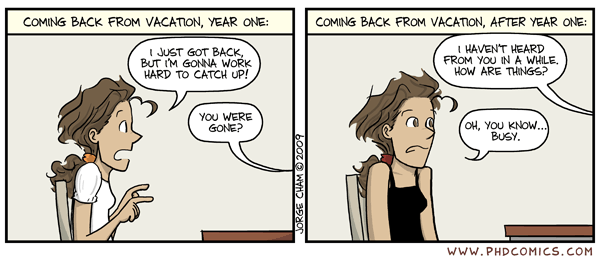
It's 2010! I'm back!


Sunset at Tian'anmen

It's been two weeks since I came back. Haven't check my blog until now. I'm sure somebody will be curious where I went for the past four months. I was traveling. I spent almost three months doing an attachment in China. Mainly bioinformatics analysis.

Hmmm... what should I write in the first post of 2010?! A notification that I'm back ofcourse. :p Considering how busy I am lately, I don't think I have much time to update my blog regularly. It's a pity. Oh well, I guess I will just make a quick post everytime I think of something.

Read more...

Monday, September 14, 2009

It's vacation time!

Yeah! The long-awaited vacation is just around the corner. Then, I'll leave Malaysia to do an attachment. See you next year! :p

Read more...

Thursday, August 27, 2009

Some recent thoughts (August 09)

Busy... seems like the only word I always use to describe my life. lol... I think people are tired of hearing that word from me.

At the end of August, I attended the MSMBB post-conference symposium. After looking at the programme and speaker list, there's no way I can miss this. I was right. Not only did I gain so much knowledge, it's a nice break from my busy life for a couple of days. It gives me new ideas and directions on my work. When I interact with other researchers, I feel very excited about the new things i can do. Enthuasiasm is contagious. I took the advice of the organizer to go home, think about what I wanna do next and write it down. Suddenly, I feel that those few days are so well-spent.

So next time you feel like you can't breathe or what my housemate call "living everyday like a photocopy machine", just take a break to attend a seminar or conference. Go home, think, and write a note.

Read more...

  © Free Blogger Templates Spain by Ourblogtemplates.com 2008

Back to TOP